
How to file Nil VAT returns on Rev360 in Nigeria: a practical guide for SMEs
Nigerian businesses can still attract ₦100,000 penalties for not filing VAT returns even when there were no sales. This step-by-step guide shows you how to file a Nil VAT return on the Rev360 portal correctly, avoid late-filing penalties, and stay compliant with the Nigeria Revenue Service.
For many Nigerian businesses, tax compliance is no longer a once-a-year scramble. With the introduction of digital tax administration platforms like the Nigeria Revenue Service's Rev360, business owners must now file tax returns consistently, even when there was no trading activity during the month.
One of the most expensive mistakes Nigerian SMEs make is assuming that no sales means nothing to file. Under the Rev360 system, that assumption can quickly attract penalties of up to ₦100,000 per default. If your business fails to submit a VAT return before the due date, the system may impose the penalty automatically, even when your actual VAT liability is zero.
At Digitglance Reliance, we have observed that startups, consultants, contractors, retailers, and service businesses regularly struggle with the technical process of filing Nil VAT returns correctly on Rev360. This guide walks you through the process in plain language, the way a Nigerian accountant would explain it to an SME owner who just wants to stay compliant without surprises.
₦100,000
Possible penalty for late or missing VAT returns
21st
Day of the following month: VAT filing deadline
Monthly
Filing required even when there are zero sales
3–5 days
Recommended buffer before the deadline
Understanding Nil VAT returns in Nigeria
A Nil VAT return simply means your business had no vatable transactions during a particular tax period. Common scenarios include:
- No sales recorded during the month
- A newly registered business that has not started operations
- Temporary business inactivity or shutdown periods
- Seasonal businesses operating during off-peak months
- Businesses that only incurred expenses without making taxable sales
Even in these situations, Nigerian tax regulations still require you to file. Skipping the return because "there was nothing to declare" is one of the most common reasons SMEs get hit with avoidable penalties. Non-compliance can also create downstream problems: difficulties processing your Tax Clearance Certificate (TCC), unnecessary friction during loan applications or investor due diligence, delays on government contracts, and harder audit cycles when the next NRS review comes around.
What is Rev360?
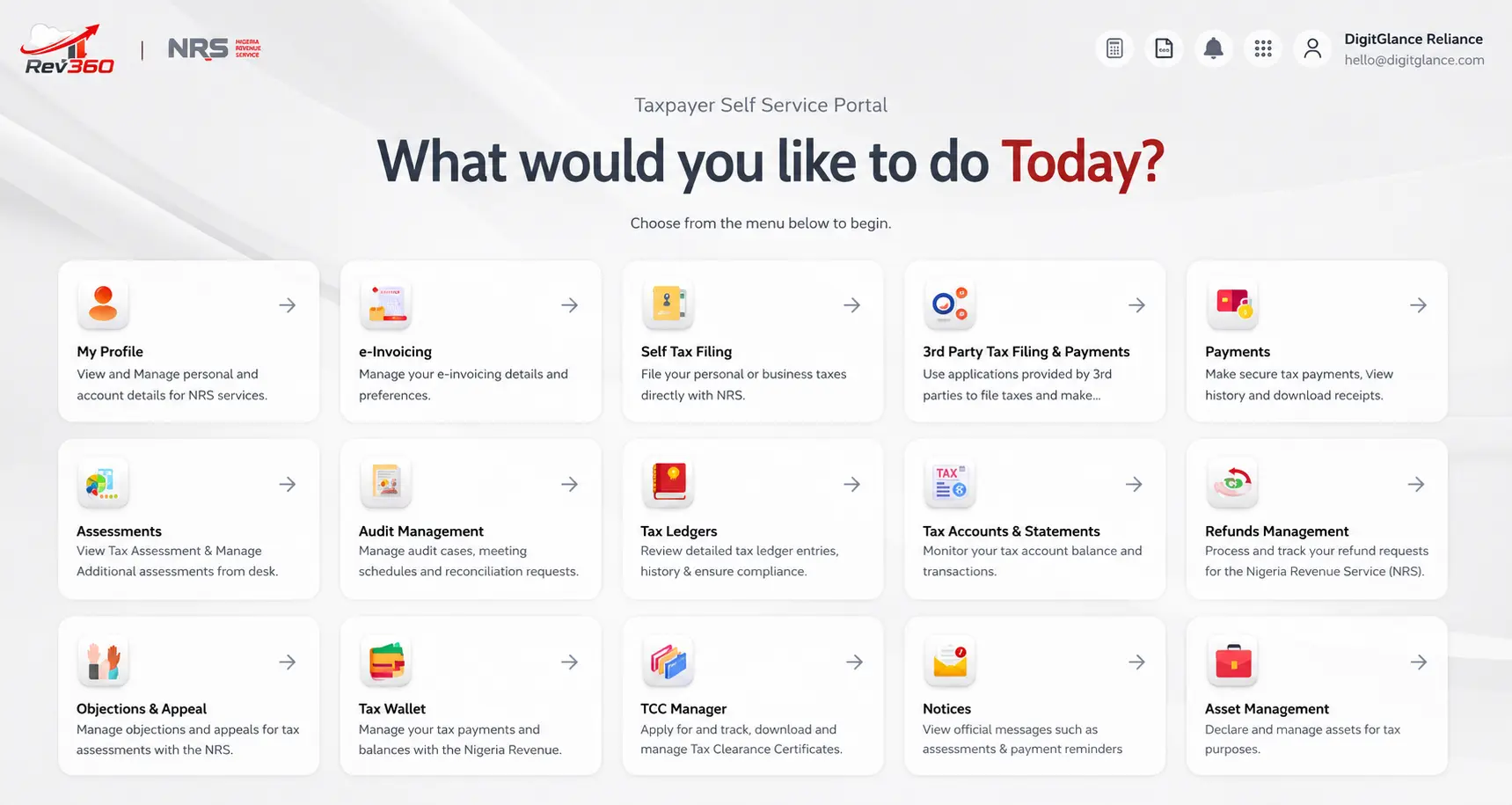
Rev360 is the digital tax administration platform introduced by the Nigeria Revenue Service (NRS) to modernise tax filing, assessment, and compliance management across Nigeria. It replaces the older TaxPro Max environment and brings VAT, Company Income Tax (CIT), PAYE, withholding tax, and self-service taxpayer management into a single, integrated portal.
For SMEs, Rev360 raises transparency, but it also raises the technical bar. The portal expects clean records, structured templates, and on-time submissions. If you would like a broader overview before you start filing, our companion article Rev360 by NRS: what Nigerian businesses must understand covers the wider context.
Why filing Nil VAT returns is non-negotiable
Many Nigerian business owners ignore Nil filings because they reason that no revenue means no obligation. Under Rev360, that logic does not hold. Once your business is registered for VAT, the monthly filing obligation is automatic. The system creates an assessment for every period and tracks whether you have filed.
Why this matters financially
Failure to file VAT returns on time may attract penalties of up to ₦100,000 per default, depending on the situation and regulatory enforcement. For a small business, repeated defaults can quickly disrupt working capital, supplier payments, and payroll obligations, for a tax return that genuinely owed zero naira.
VAT filing deadline in Nigeria
VAT returns must generally be submitted on or before the 21st day of the following month under Nigerian VAT regulations. For example:
- April VAT return → file on or before 21 May
- May VAT return → file on or before 21 June
- June VAT return → file on or before 21 July
Practical recommendation: do not wait until the deadline day. Nigerian tax portals occasionally experience heavy traffic, slow processing, upload failures, and short downtimes near filing deadlines. At Digitglance Reliance, we advise clients to complete filings at least 3 to 5 days before the deadline. A small buffer protects you from portal congestion and gives you time to resolve any rejection if it happens.
Step-by-step guide to filing Nil VAT returns on Rev360
The process below assumes you are already registered for VAT and have valid Rev360 login credentials. If you do not yet have access, your tax consultant or the NRS portal support team can help you complete onboarding before you continue.
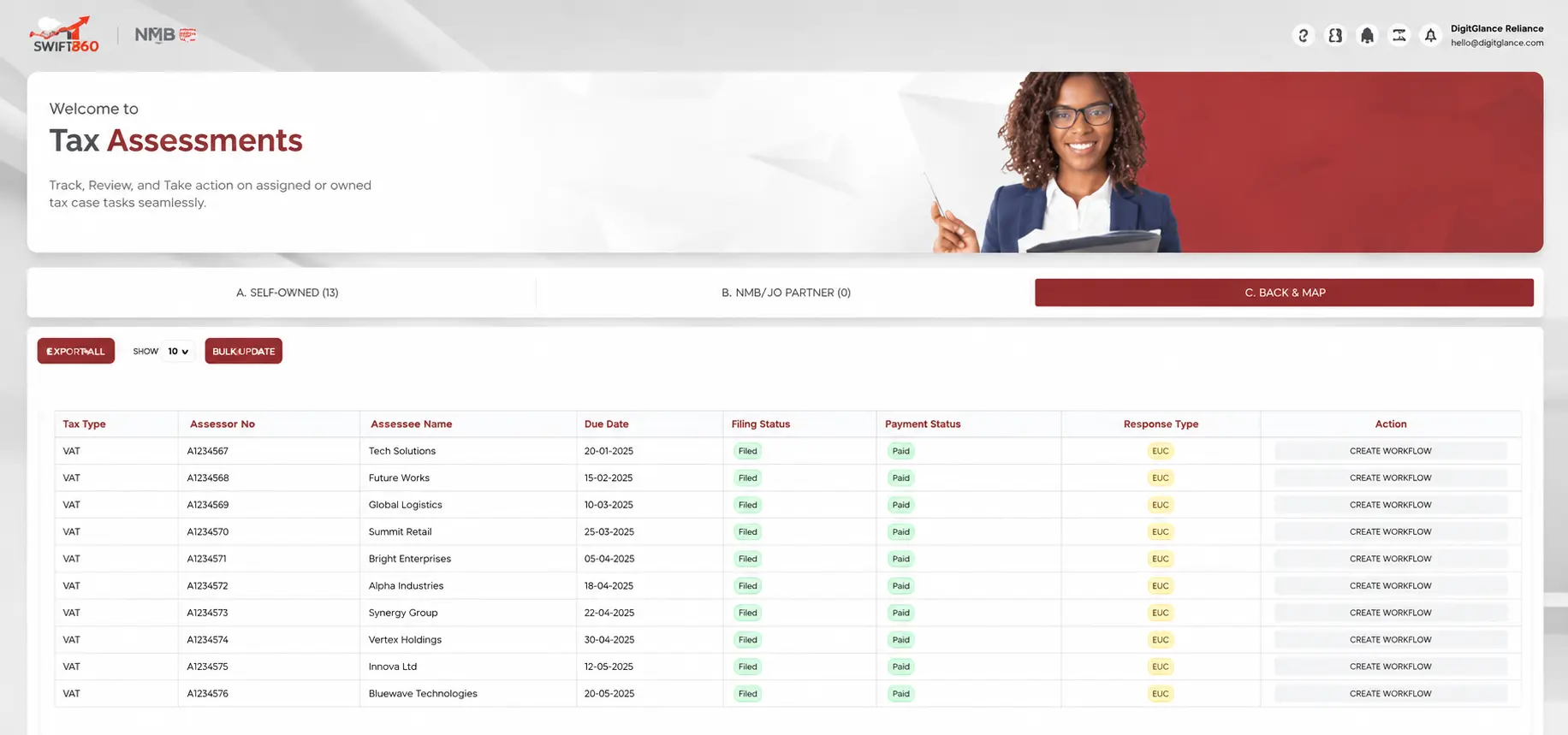
Step 1: Log into the Rev360 portal
Visit the official Rev360 portal and log in with your company credentials. After login, navigate to Self Service or Self Tax Filing, then locate the VAT section. Any obligation marked as Due is what you click into to begin.
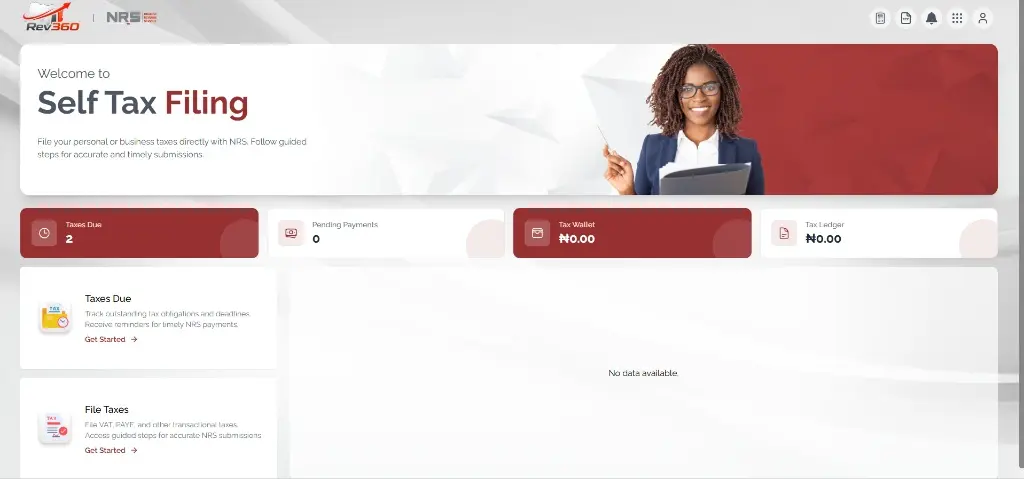
Step 2: Open the VAT obligation marked "Due"
Inside the Taxes Duesection you will see every outstanding obligation, including each month's VAT return. Click File Now next to the VAT row for the period you want to file.
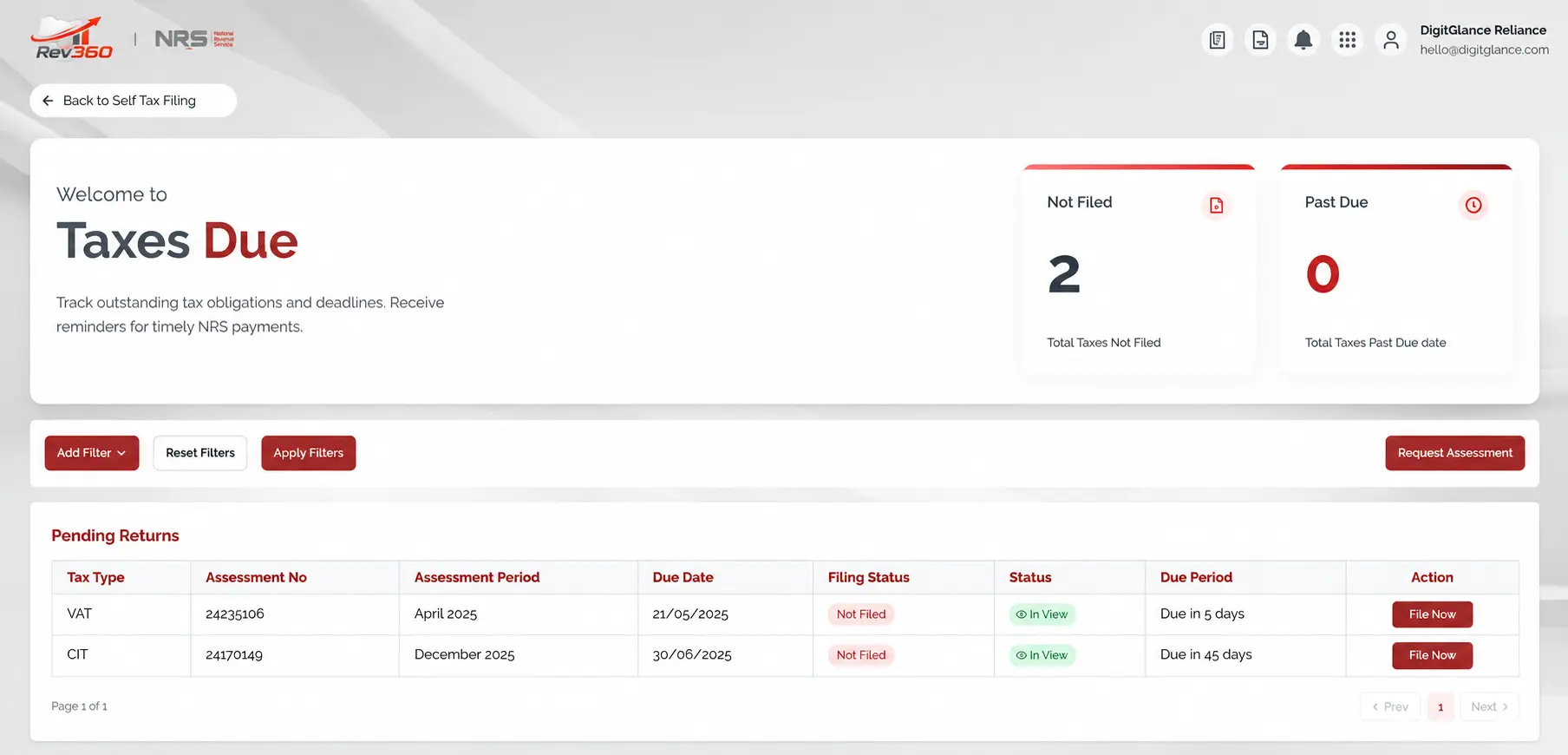
The system will automatically populate the tax type, filing month, currency, and your taxpayer information. Confirm the details are correct before continuing, particularly the period and the currency (₦ NGN by default for most Nigerian businesses).
Step 3: Download the official VAT template
Rev360 provides a structured Excel template (Form VAT 002) used for every submission. Click Download VAT Template on the upload screen.
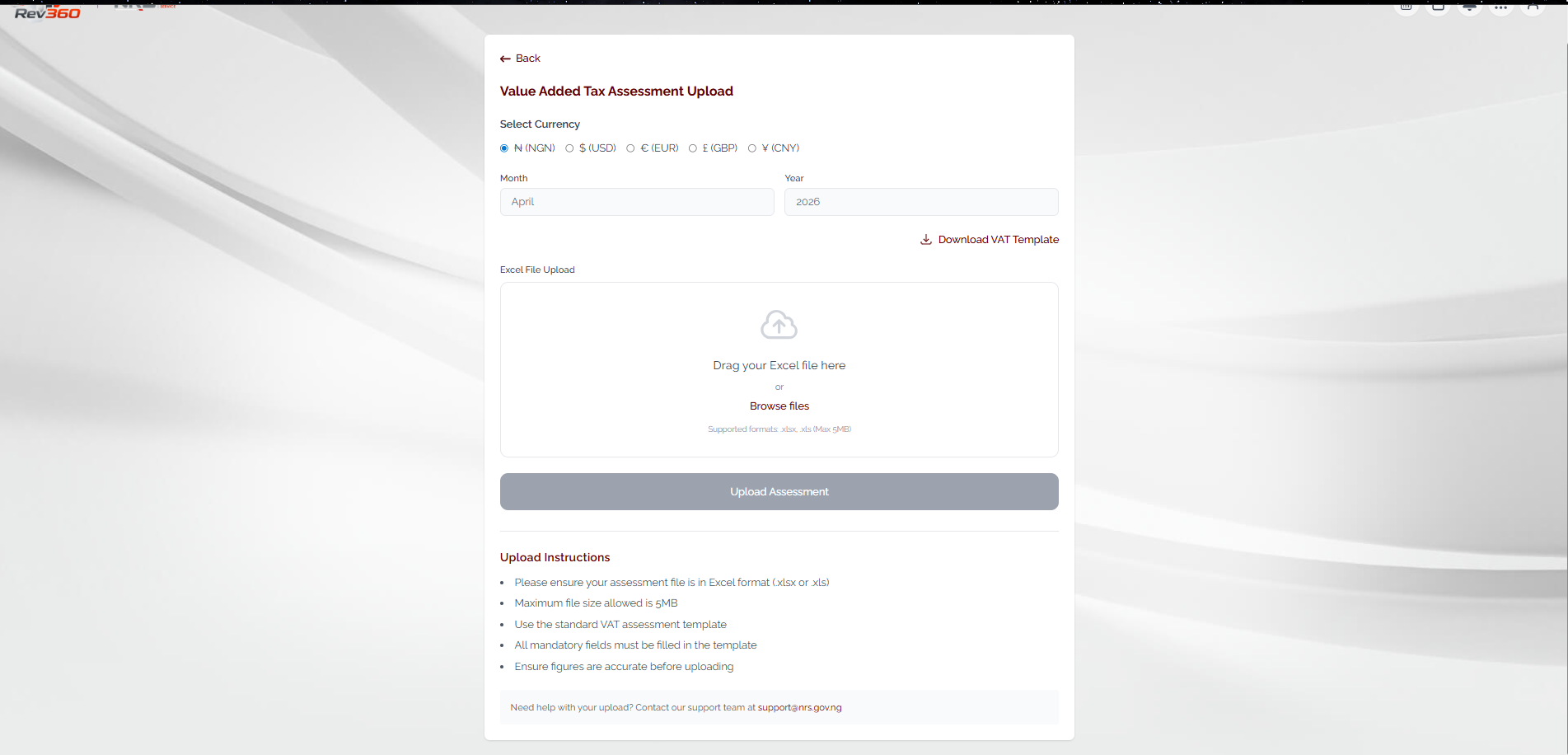
Once the file is downloaded, rename it immediately so you can find it later during audits or internal reviews. A consistent naming convention helps:
VAT_April_2026_Nil.xlsxVAT_May_2026_Zero_Return.xlsx
Step 4: Do NOT enter any figures
This is the step where most SMEs go wrong. The Rev360 template (Form VAT 002) is built with protected cells and embedded validation logic. The system interprets an unmodified template as a Nil return.
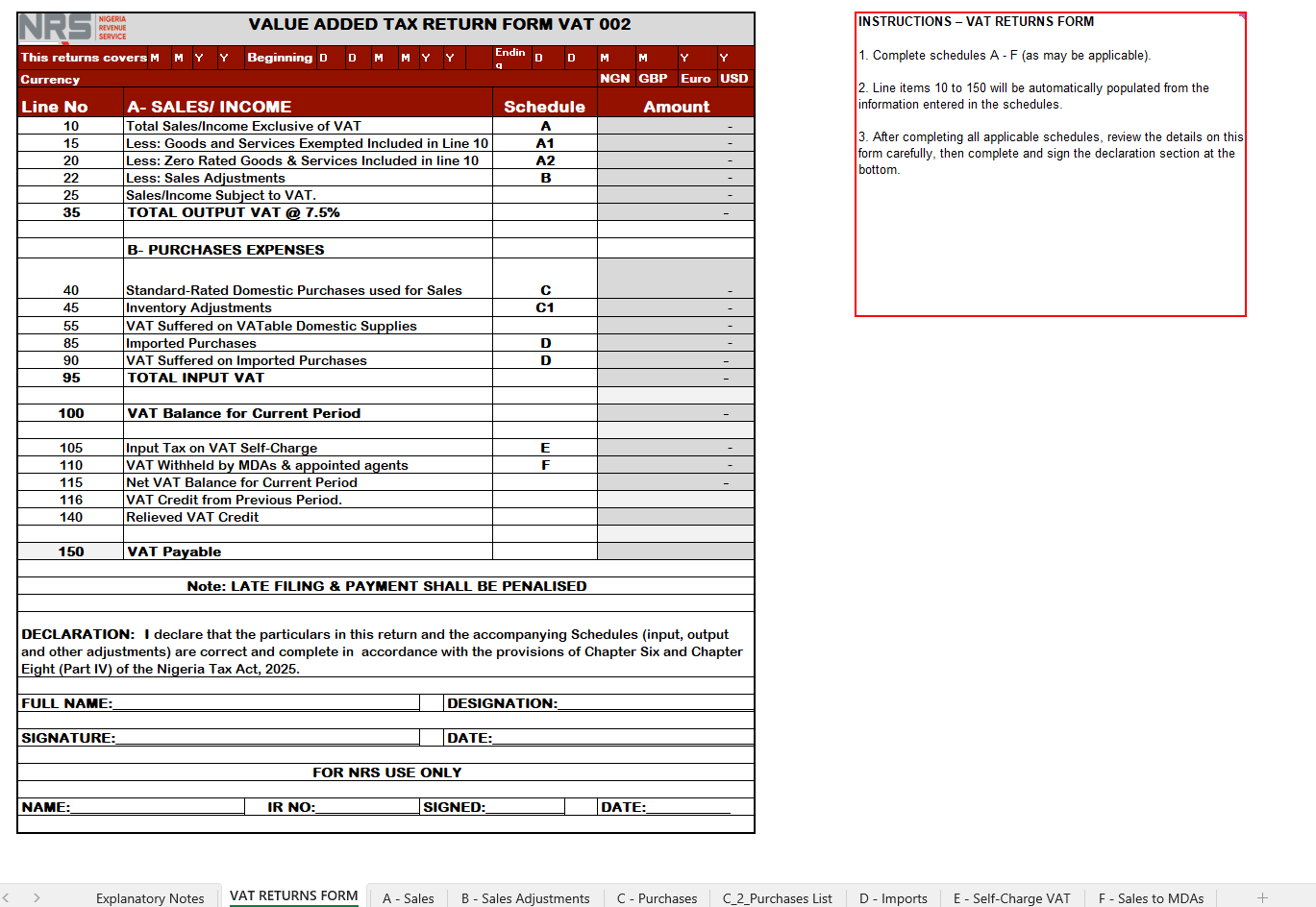
What NOT to do on a Nil return template
Do not type 0 into any cell. Do not insert formulas, delete sheets, modify formatting, rename worksheet tabs, or add extra rows or columns. The template must be uploaded exactly as it was downloaded. Most Nil-return rejections happen because someone tried to manually input zeros into protected cells.
What you should do is much simpler:
- Open the downloaded Excel file
- Enable Editing if Excel prompts you
- Save the document without entering any information
Step 5: Upload the saved template
Go back to the Rev360 upload section, browse for the saved file, and upload it. Click Upload Assessment and wait for the system to validate the file.
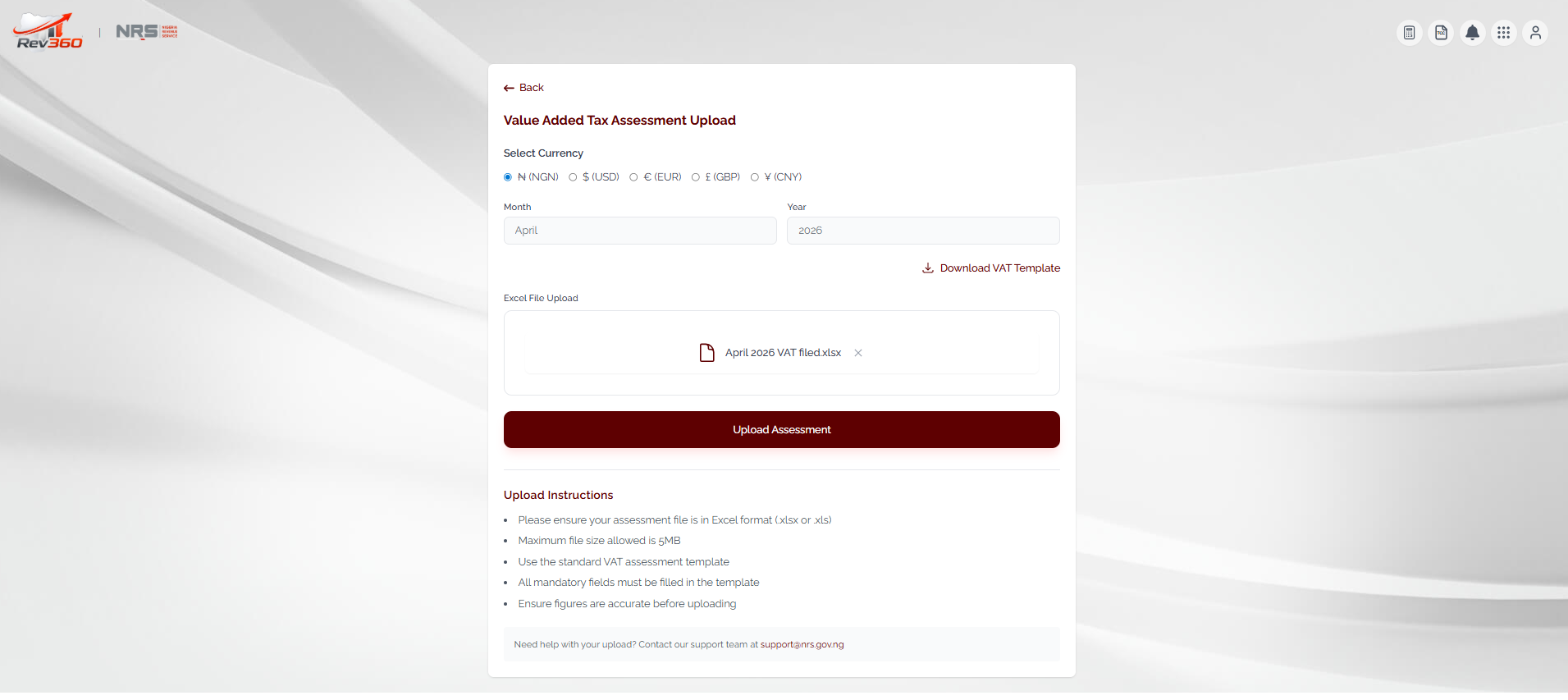
Step 6: Review the assessment result
After upload, Rev360 displays the full VAT 002 form populated from your file. For a properly filed Nil return, every line, Total Sales, Output VAT, Input VAT, and VAT Payable, should read 0.00 or Nil.
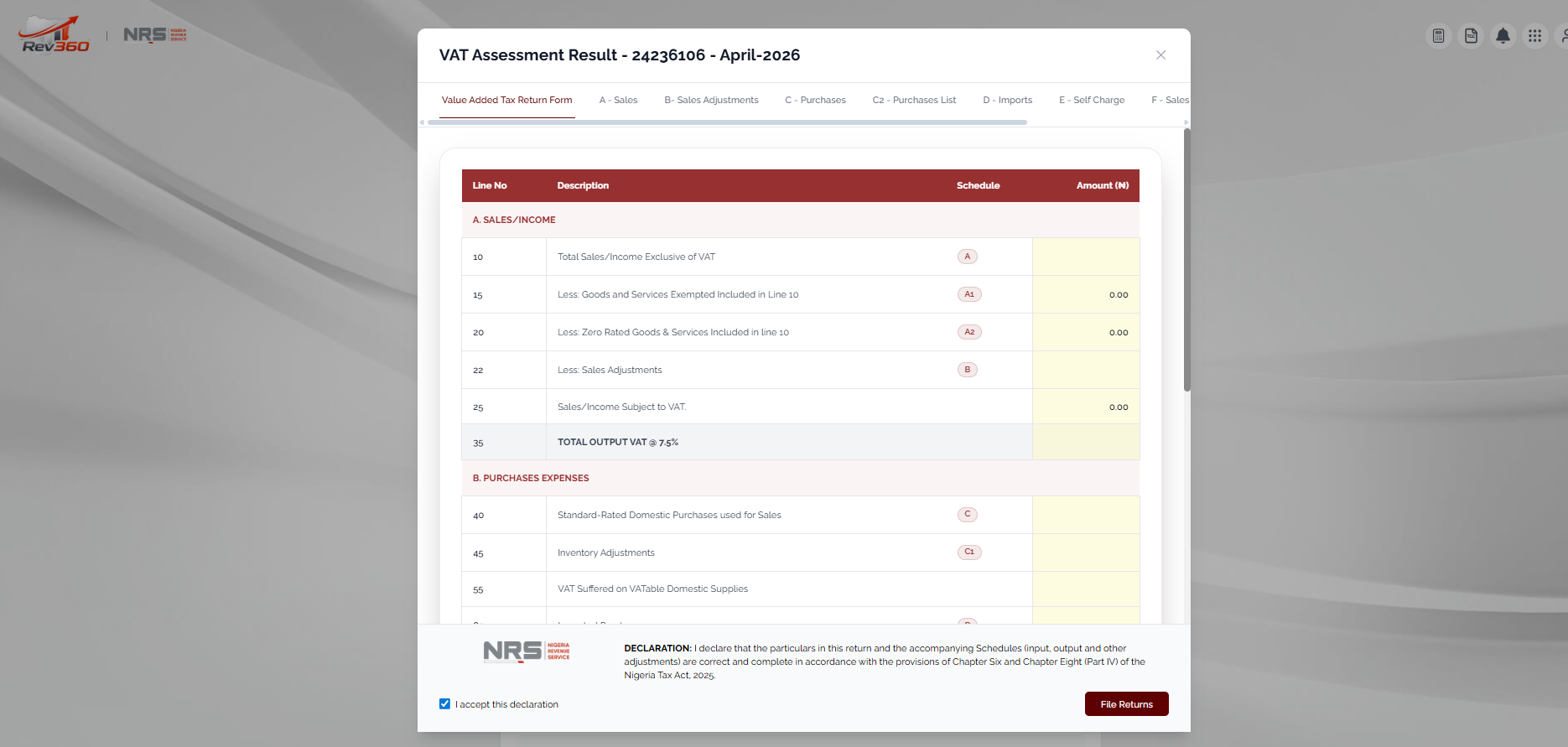
Review the figures carefully. If anything is unexpectedly non-zero, abort the submission, download a fresh template, and try again. Do not file a return you have not personally verified.
Step 7: Accept the declaration and submit
Tick the I accept this declaration checkbox at the bottom of the assessment, then click File Returns. The portal will display a confirmation message and a filing reference number. Save or print the acknowledgment for your records, your accountant or auditor will want this if your filings are ever queried.
Common errors Nigerian SMEs make on Nil VAT filings
1. Typing "0" into the template
Many users assume they need to manually enter zeros. On Rev360, this often causes validation errors because the template contains automated logic and protected fields. Leave it blank.
2. Waiting until deadline day
Portal congestion near deadlines can prevent successful uploads. Late-filing penalties still apply even if the portal was slow, the business had no income, or your filing was only one day late. Build a habit of filing 3–5 days before due date.
3. Editing the template structure
Do not change worksheet names, compress the file, convert it to another format, or modify the underlying formulas. The validator will reject any structurally altered file.
4. Ignoring filing because the business was inactive
Even dormant companies may still have filing obligations depending on registration status and trading history. Confirm your filing obligations with a qualified tax professional before assuming you can skip a period.
5. Not saving the acknowledgment
The filing receipt is your proof of compliance. Save a PDF copy and store it in a consistent folder structure (one folder per tax year, one subfolder per month). Future you, your auditor, and your bank will thank you.
Frequently asked questions
Can I file a previous month manually?
The filing period is generated automatically by the portal. If previous filings are outstanding, Rev360 may require those periods to be resolved before you can file a current return. The earlier you catch missing periods, the cheaper they are to clear.
Is payment required for a Nil return?
No. A properly filed Nil VAT return does not generate any tax payment liability, the VAT Payable line will read zero. You only owe penalties if you fail to file at all.
What if the portal rejects my upload?
The most common causes are:
- The template was modified (cells edited, sheets renamed, formulas changed)
- The file was saved in the wrong format (must be
.xlsxor.xls) - The Excel file was corrupted during download or transfer
- The file exceeds the 5 MB upload limit
If you hit any of these, download a fresh template and repeat the process from Step 3.
Can small businesses simply ignore VAT filing?
No. Once registered for VAT, compliance obligations continue regardless of sales volume. Even if your sales were zero for the period, the return still needs to be filed.
Best compliance practices for Nigerian SMEs
To keep your VAT compliance clean throughout the year:
- Maintain monthly bookkeeping records, not quarterly catch-ups
- Reconcile sales, purchases, and bank statements monthly
- File returns at least 3 days before each deadline
- Keep digital copies of every filing acknowledgment
- Monitor your Rev360 notifications inbox at least weekly
- Work with a qualified accountant or tax consultant for complex months
- Use accounting software that produces NRS-aligned reports automatically, your monthly VAT schedules should not be hand-typed
Compliance is leverage
Nigerian businesses with clean compliance records consistently report easier access to bank financing, faster Tax Clearance Certificate processing, smoother government contract bids, and stronger investor due-diligence outcomes. Treat your monthly filings as a long-term business asset, not a chore.
How Digitglance Reliance supports Nigerian businesses
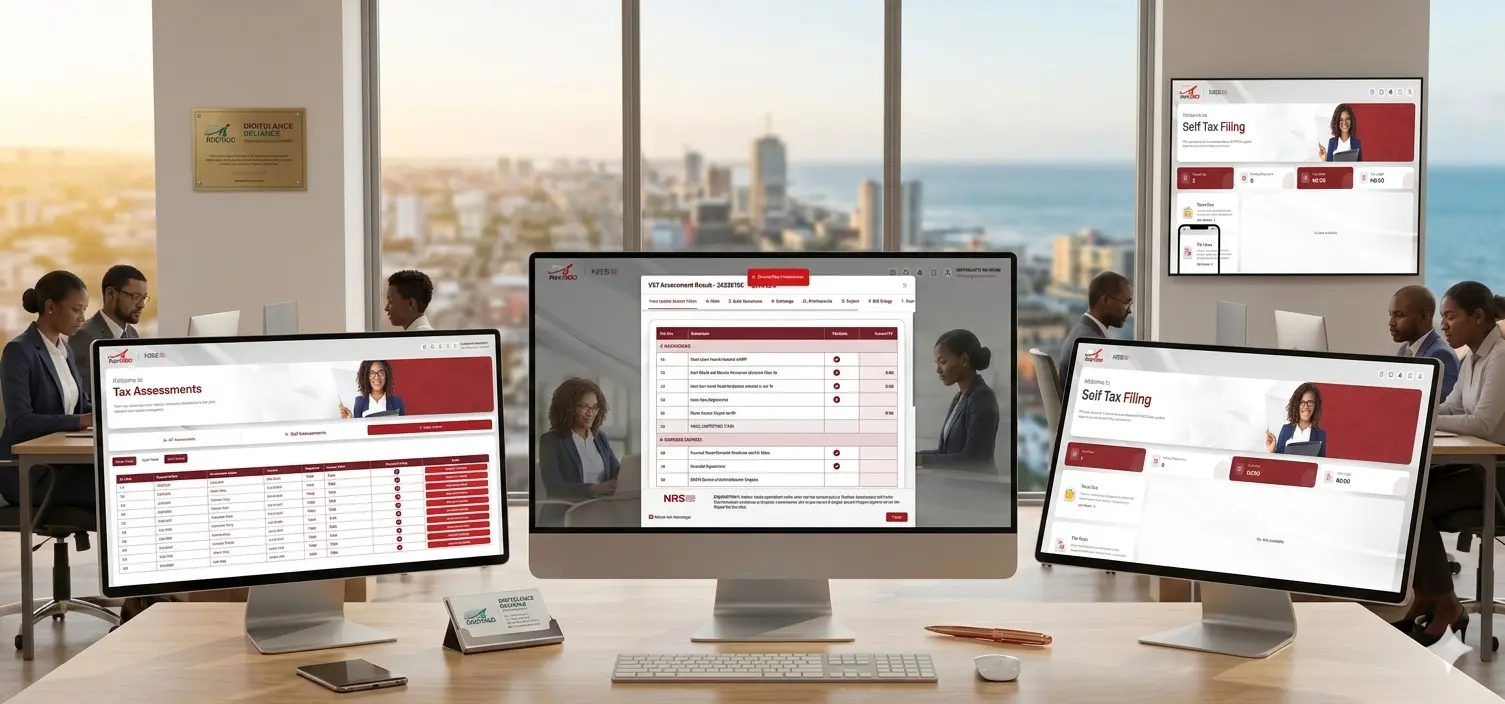
At Digitglance Reliance, we help Nigerian SMEs simplify Rev360 filing, VAT compliance, accounting automation, tax reporting, financial record management, and cloud accounting implementation. We work with startups, consultants, retailers, contractors, and growing businesses that want practical, audit-ready accounting systems without unnecessary complexity.
If your business needs support with Rev360 filing, VAT compliance, accounting setup, or financial automation, reach out at hello@digitglance.com or visit digitglance.com to learn more about how we can help you stay compliant and focused on growing your business.
Track your books, file VAT, and get paid faster.
DigitGlance Trade handles invoicing, POS, VAT, inventory, and reports so you can focus on running the business, not on chasing receipts.
More articles
 Tax practice
Rev360 by NRS: what Nigerian businesses must understand about Nigeria's new digital tax administration system
Monthly VAT return
NRS · Form 002Output VAT
₦60,000
−Input VAT
₦30,000
Payable to NRS₦30,000File by the 21st via NRS Rev360Tax practiceHow to calculate and file VAT in Nigeria for small businesses